SSO ID Forgot Password 2026: Easy Rajasthan Reset Guide
A common problem is faced by the users that they forget their SSO ID or password due to weak memory retention and infrequent logins. In that case, users can recover their SSO ID Forgotten password by a very simple and easy process without any hassle.
SSO ID Password reset Rajasthan is designed to recover forgotten SSO ID and password by using personal details like SAN (Sanstha Aadhaar Number), Bhamashah ID, Jan Aadhaar ID, BRN, SIPF ID, email ID and Google account. The whole reset process is completely secure as it uses OTP and Captcha verification.
How to Recover SSO ID Forgot?
In case you forget your SSO ID (Single Sign-On ID), you can recover it by using following process:
- Open official Rajasthan SSO Portal.
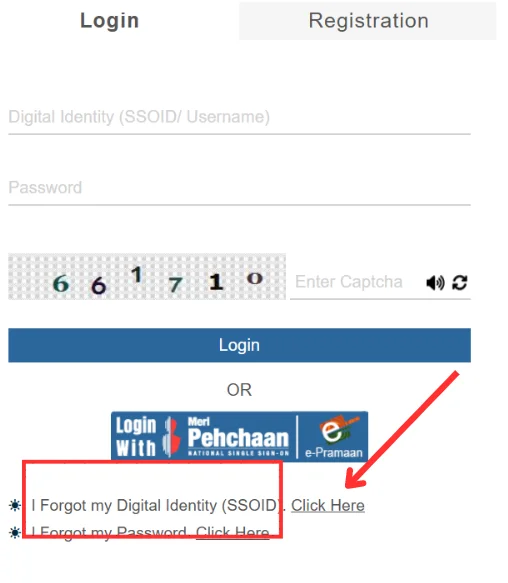
- Click on the “Forget SSO ID”.
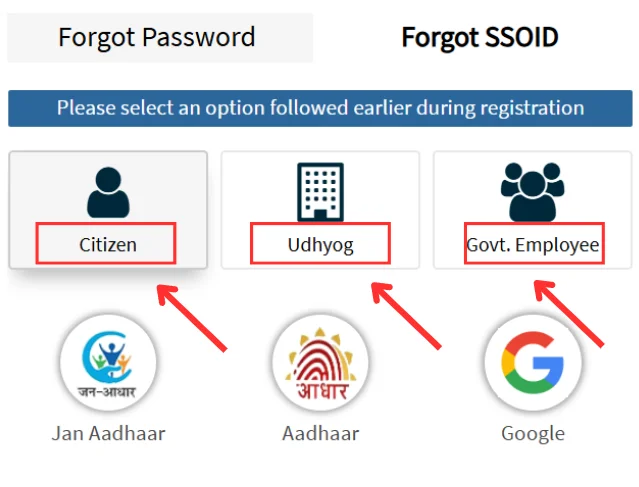
- Select your relevant type Citizen, Government Employee, or Udyog.
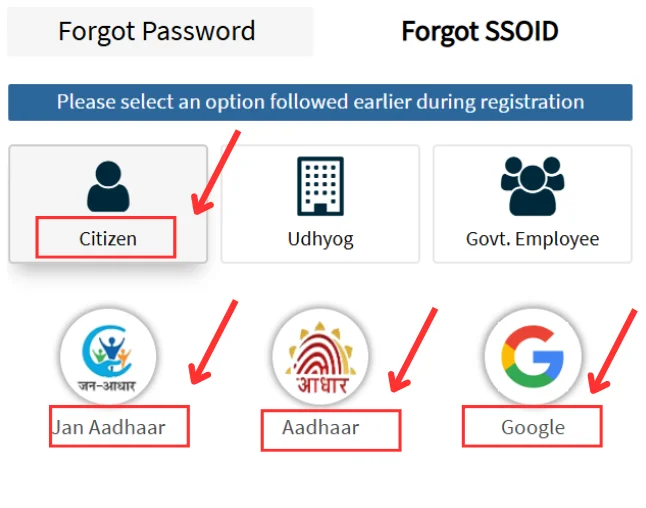
- After selecting the relevant type, click on the preferred option such as Mobile number, Email ID, Aadhaar Card etc. to get OTP or Reset link.
- Enter the required details and complete OTP verification then click on the “Submit” tab.
- Your recovered SSO ID is either displayed on your screen or sent onto your selected option.
Recover SSO ID Password from Mobile
Recovering SSO ID Forgot password from Mobile Number is the simplest and most fastest method. Users can recover their password via registered Mobile number by following given steps:
- Visit official website of Rajasthan sso.rajasthan.gov.in.
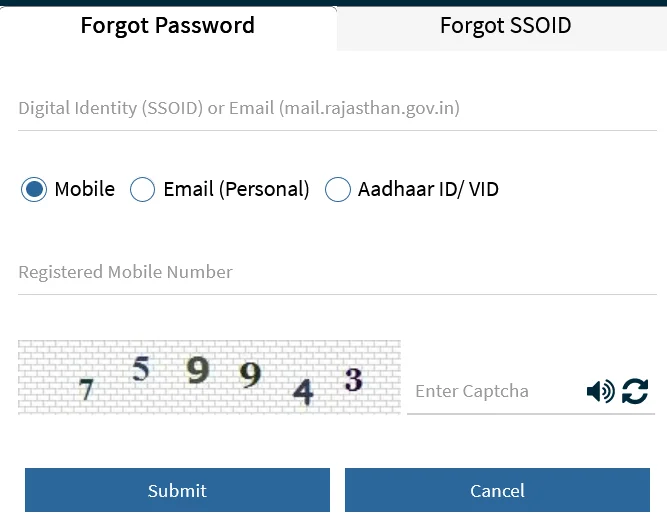
- Click on the “Forget Password” tab shown on the screen.
- Enter your SSO ID and required details.
- Few options shown on the screen such as Aadhaar, Email, Mobile number etc.
- Choose “Mobile” as a preferred option.
- An OTP is received on your registered mobile number.
- Complete the OTP verification process and click on the “Submit” tab.
- The user will receive an instant message with the reset link on the registered mobile number.
- Click on the link and reset a new strong password.
Recover SSO ID Forgot Password from Email ID
Users can recover their SSO ID Password from email ID by following process:
- Go to the Rajasthan official portal.
- Click on the “I forget my password” .
- Enter your SSO ID and required details.
- Select “Email ID” as preferred option.
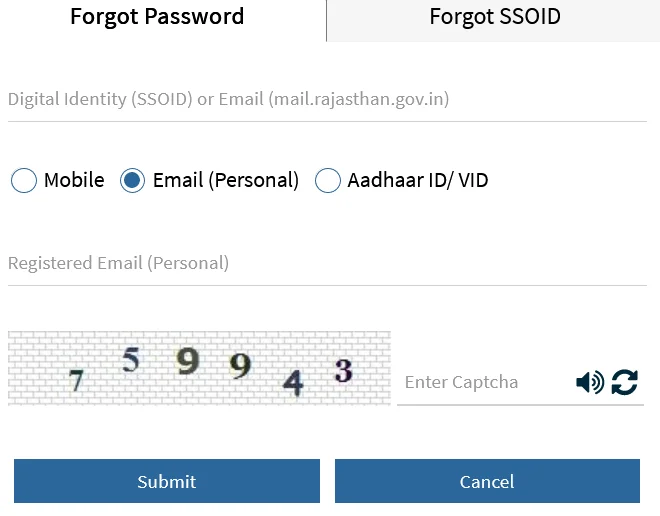
- An OTP is received on registered email.
- Use that OTP for verification and click on “Submit”.
- Reset link is received on email ID by clicking that link user can create a new secure password.
Recover SSO ID Password by Aadhaar ID/VID
If a user’s Aadhaar card is linked to their SSO ID then they can also recover their SSO ID Password through their Aadhaar ID/VID. Here is the step-by-step recovery process:
- Open SSO Rajasthan official portal.
- Click on “Forget Password” shown on the screen.
- Enter your SSO ID and other details.
- Select the “Aadhaar ID “ option.
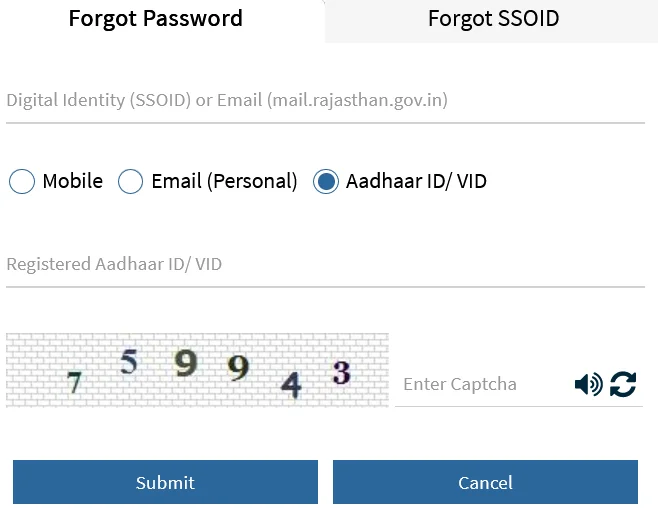
- An OTP is received on user Aadhaar ID.
- Use that OTP for verification.
- After completing the verification process, click on the “Submit” tab.
- Reset link is provided to user Aadhaar ID, by clicking on link user can reset password.
Recover SSO ID Password through SMS
User can Recover their SSO ID Forgot without any internet connection via SMS. This is the simplest process by which a user can recover their SSO ID Password:
- Open a messaging app on your device.
- Type: RJ SSO PASSWORD
- Send this Message to helpdesk/ helpline number 9223166166.
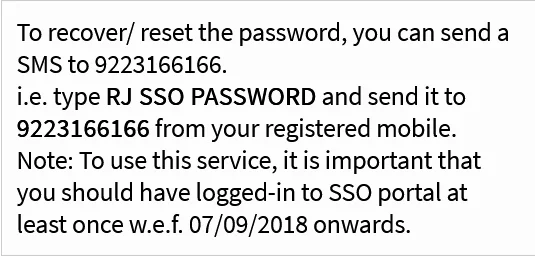
- Users must send the SMS via Registered mobile number.
- All SSO password details will be received to your registered mobile number.
- Users can reset their password.
Reasons Why Users Forget SSO Passwords
More often users forget their SSO ID Passwords and face difficulty during SSO ID Login. There are following main reason why users forget their SSO ID password:
- Due to weak memory they can’t remember their password.
- If SSO users didn’t frequently login their SSO ID then there is more chances to forget the password.
- Users use multiple passwords for different apps so they mix up the password and forget the original one.
- SSO systems force the user to create a strong password containing letters, digits, special characters etc for security purposes.
- Users rely on Browser auto-save and don’t remember the password.
- Sometimes users reset passwords many times and forget which one is the current password.
Password Security Tips
The most important part of Rajasthan SSO Login is its security. A user should take care of the password to avoid any kind of scam. Here are some important tips to secure your password.
- Password should be long (more than 8 digits)
- Passwords should be a mix of special characters, letters, numbers etc.
- Passwords should not contain information like ID name, Date of birth, Mobile number or any other personal information.
- Passwords should be changed after 90 days.
- Choose different passwords for different apps.
- Use security features like OTP-based authentication, auto logout system etc.
Conclusion
An SSO ID Password Reset Rajasthan is a platform which is used to reset or recover SSO ID and Password in case users forget which is the most common problem faced by the users. The process of recovering forgotten passwords is very simple, easy and secure as it uses OTP authentication. By recovering the SSO ID Forgot, it again facilitates with 100 plus services. Users can recover their SSO ID through different sources like Mobile number, Email ID, Aadhaar ID, and SMS.